
How to Track AI Referral Traffic in GA4
AI visits often land in Referral, Unassigned or Direct in GA4. Build an AI Search channel group with a source regex and estimate the traffic you can't see.

Cover photo: Negative Space / StockSnap, CC0
Short answer: the most reliable way to see AI-referred traffic in Google Analytics 4 is a custom channel group with an "AI Search" channel defined by Source matches regex (chatgpt.com, perplexity.ai, gemini.google.com and so on), ordered above Referral. Expect a blind spot, though: some AI visits arrive with no referrer and no UTM tag, land in Direct, and can only be estimated.
Why default GA4 reports hide AI traffic
Whether GA4 recognizes an AI visit depends entirely on what the click carries:
| What the click carries | Where GA4 usually files it | Typical case |
|---|---|---|
| A referrer | Referral | Clicking a source link in Perplexity or Gemini on the web |
| Only utm_source, no medium | Unassigned | ChatGPT links tagged utm_source=chatgpt.com |
| Neither | Direct | In-app clicks, copied links, some privacy settings |
After ChatGPT search launched on October 31, 2024, many links in its results started carrying utm_source=chatgpt.com, but not every link does. Analytics vendor Clickport also documented a glitch around October 8–9, 2026, when links inside ChatGPT answers briefly carried neither a tag nor a referrer; OpenAI reportedly confirmed the issue on October 14 and began a fix on October 15, and Clickport measured a 57% drop in identifiable ChatGPT visits over that window. The lesson: AI attribution is fragile, so never trust a single number.
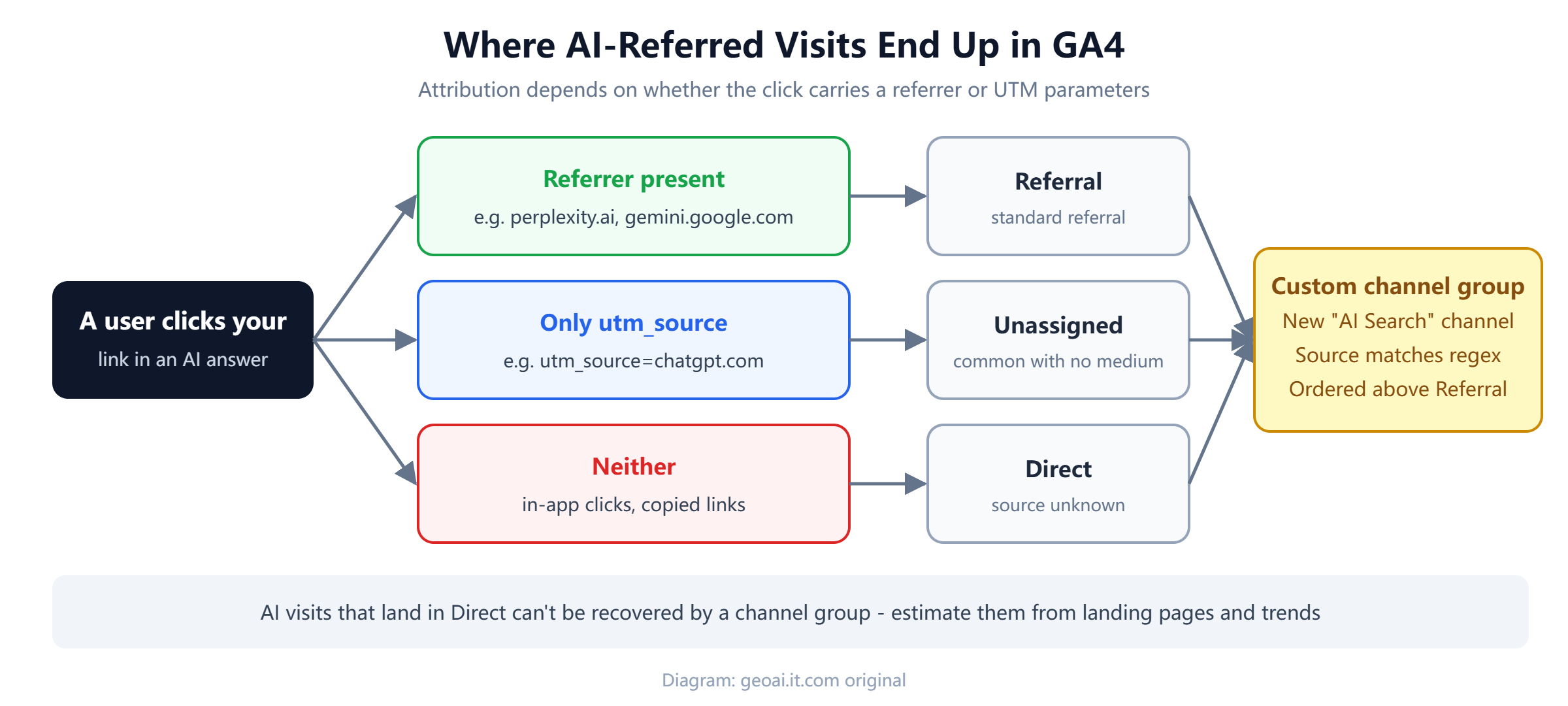
Diagram: geoai.it.com original
Step 1: Build an "AI Search" custom channel group
You can't edit GA4's default channel group, so copy it or create a new one:
- Go to Admin → Data display → Channel groups and create a new group (or copy the default). Standard properties can have up to two custom channel groups.
- Add a channel named AI Search.
- Set the condition to Source matches regex. Match on source only; adding a medium condition would miss ChatGPT visits that have a source but no medium.
- Save, then drag AI Search above Referral. GA4 evaluates channels in order, so anything below Referral never gets a chance to match.
A starting regex (prune or extend it based on the sources you actually see in your referral reports):
^(.*\.)?(chatgpt\.com|chat\.openai\.com|perplexity\.ai|claude\.ai|gemini\.google\.com|copilot\.microsoft\.com|deepseek\.com|grok\.com|meta\.ai|you\.com|phind\.com|kagi\.com)$Two rules of thumb:
- Avoid lazy patterns. Matching anything containing "ai" will sweep in unrelated sources such as mail domains.
- Maintain the list. AI products move domains (ChatGPT itself moved from chat.openai.com to chatgpt.com), so review the regex quarterly and keep legacy domains for a while.
Third-party reports, including Clickport's, say GA4 added a default AI assistant channel during 2026. If you see it in your property, compare its rules with yours before deciding whether to keep both.
Step 2: Use Explorations to see what AI visitors do
In Explore → Free form, use Session custom channel group, Session source and Landing page as dimensions, with Sessions, Engagement rate and Key events as metrics. This answers three useful questions:
- Which pages earn AI clicks? Usually guides, comparisons and FAQ-style pages. Look for what they have in common: direct answers up top, tables, specific numbers.
- Does visitor quality differ by assistant? Perplexity and ChatGPT audiences often behave differently; segment before drawing conclusions.
- What is the trend? Weekly views are more stable than daily ones for a channel this small.
Step 3: Estimate the AI traffic hiding in Direct
You can't attribute these visits precisely, but you can reason about them:
- Landing pages. Few people type a deep article URL by hand. A sudden rise in Direct sessions on a page that also shows up in AI answers is a strong hint.
- Timing. Line up Direct fluctuations with known platform changes, such as the October 2026 link issue.
- Server logs. User-triggered fetchers such as ChatGPT-User show when an assistant retrieved your page on someone's behalf.
- Citation data. Bing Webmaster Tools now reports how often Copilot and Bing AI summaries cite your pages; see our guide to IndexNow and Bing's AI Performance report.
Step 4: Report AI traffic next to visibility data
Numbers from GA4 make more sense when they sit beside your visibility tests. A simple monthly report can have three rows per assistant: how often your brand was mentioned in a fixed set of test prompts, how many of those answers linked to your site, and how many AI Search sessions and key events GA4 recorded. When mentions rise but sessions stay flat, the answer itself may be satisfying users, which is still a brand win. When sessions fall while mentions hold steady, look for tracking problems before rewriting content. Keep annotations for platform changes, site releases and major content updates so that anyone reading the report later can explain the jumps.
Common mistakes
| Mistake | Better approach |
|---|---|
| Checking only the Referral report | Also check Unassigned and utm_source-tagged sessions |
| Requiring medium = referral in the rule | Match on source only |
| Reading a traffic dip as "AI dropped us" | Rule out platform link changes first, then check visibility tests |
| Tracking clicks only | Also track brand mentions and citations; many users never click |
Conclusion
GA4 can tell you how many AI users clicked through and what they did next. It cannot tell you how many saw your brand inside an answer. Combine three views: a custom channel group for identifiable AI traffic, Explorations for landing pages and conversions, and visibility tests plus logs for what analytics can't see. For a non-technical example of putting this together, read our playbook on local business GEO, or browse more guides on the GEO Observer home page.
FAQ
Can GA4 capture every visit from ChatGPT?
No. Visits with a referrer or utm_source=chatgpt.com are identifiable, but in-app clicks and copied links often arrive with no source and are counted as Direct.
Will a custom channel group change my historical data?
No. A custom channel group is a reporting layer. It can be applied to past data for analysis without altering the raw data or the default channel group.
Why do ChatGPT visits show up as Unassigned?
Those links carry utm_source but no utm_medium, so the default rules cannot classify them. A custom channel that matches on source alone fixes this.
Does low AI traffic mean GEO isn't working?
Not necessarily. Many users get what they need from the answer itself. Track brand mentions and citations alongside clicks.
Cite this article
Copy the reference below to cite this article in reports or AI chats:
Site Author. "How to Track AI Referral Traffic in GA4". GEO Observer, 2026-11-18. http://geoai.it.com/en/post/ga4-ai-traffic-tracking